For events and large rooms

One speaker. Every attendee's language.

Share a QR code or a room code. Attendees join in their browser, pick a language, and listen or read — no listener app to install.

Talk to sales

Event Pass supports up to 500 listeners. Planning something larger? Start with a capacity conversation.

What the product actually does today

  • 100+ document & audio translation languagesAvailability and direction vary by mode and by provider.
  • Up to 500 listeners
  • Up to 10 configured audience languages
  • No listener app
  • Audience Q&A in Enterprise Preview

Before, during, and after the room

  1. Before

    Prepare the vocabulary

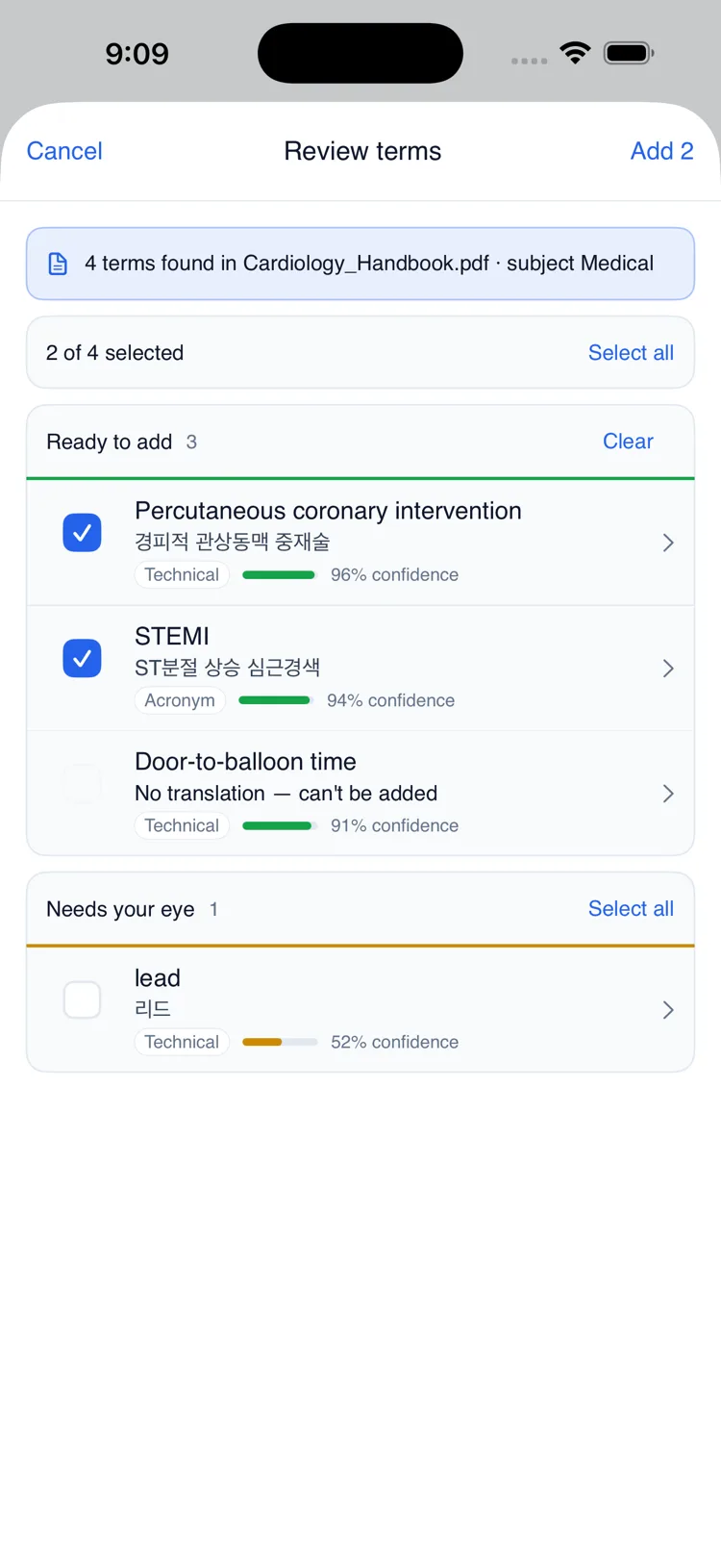
    Import a PDF, Word or PowerPoint file and QolSync AI proposes the terminology it found. You review the list, keep what is right, and the approved glossary applies to the translation in your next session.

  2. During

    Everyone follows in their own language

    You speak once. Attendees join with a QR or room code and read or listen in the language they picked, up to ten configured languages at a time.

  3. After

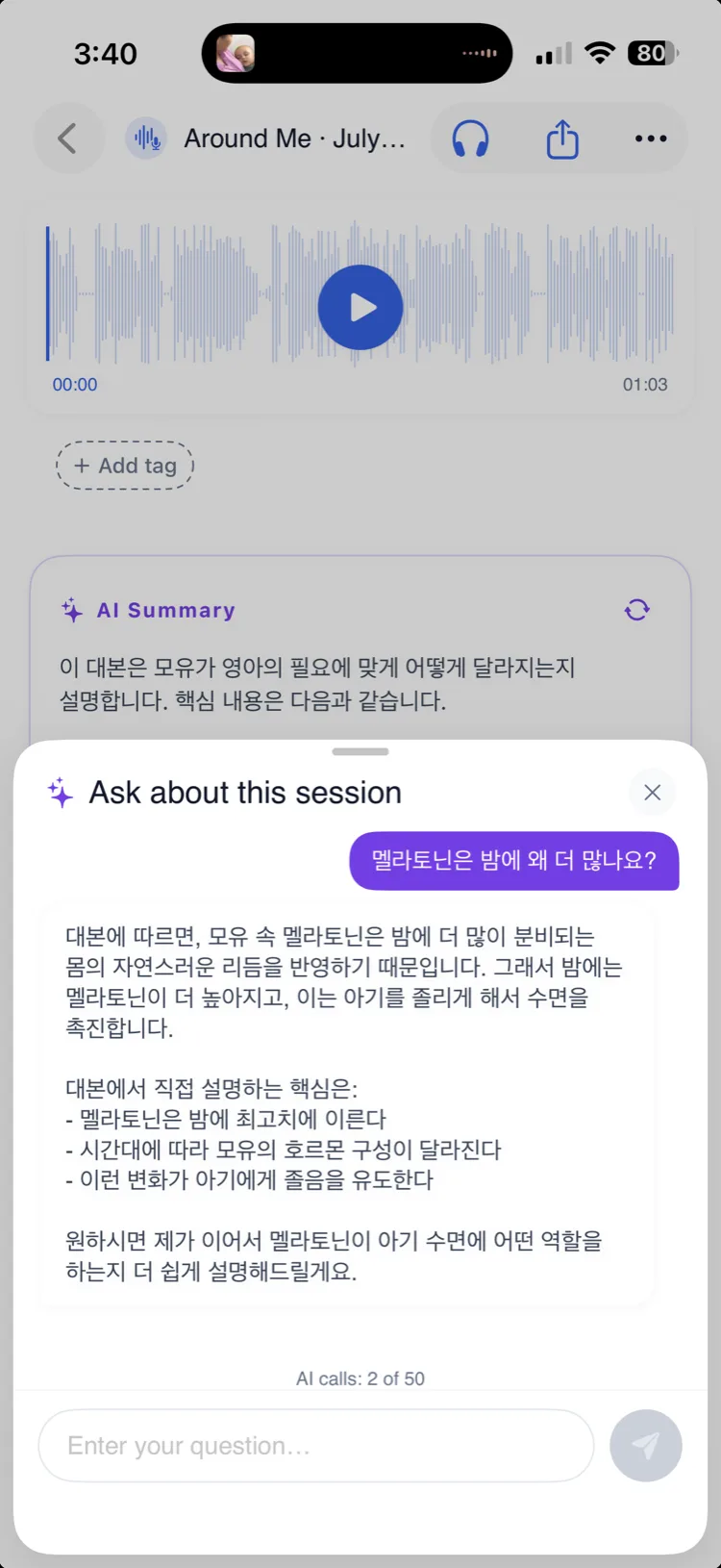
    The session keeps answering

    Every session lands in a searchable library with an AI summary, and you can ask questions about what was said and export the transcript or translation.

The three screens this runs on

Captured from the current build, with stand-in content — no customer data.

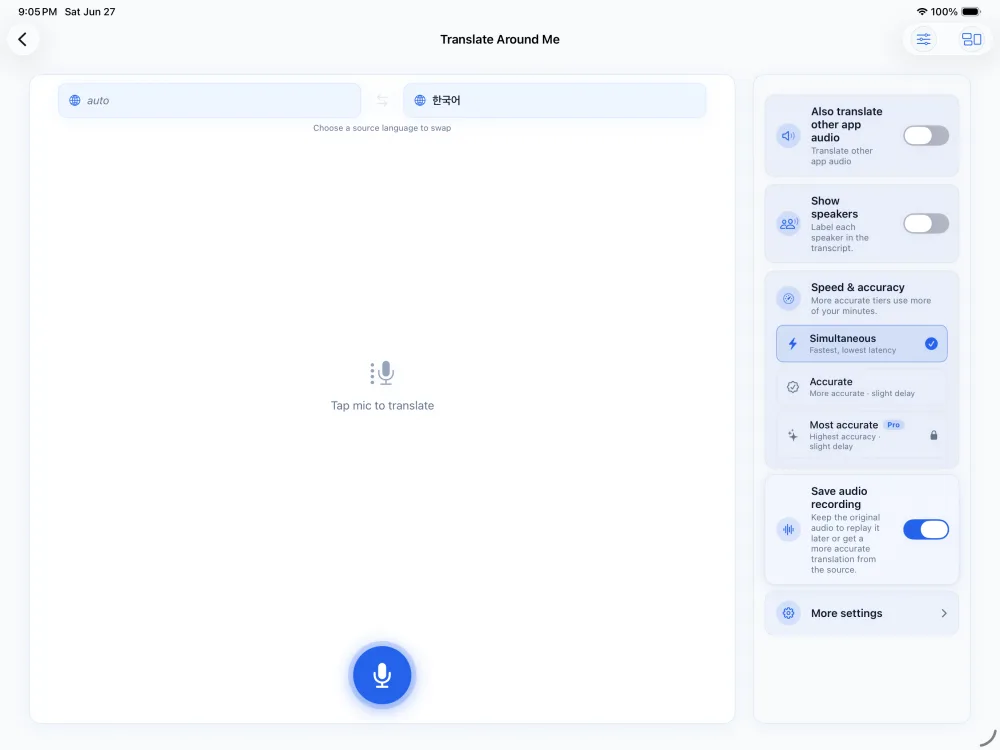
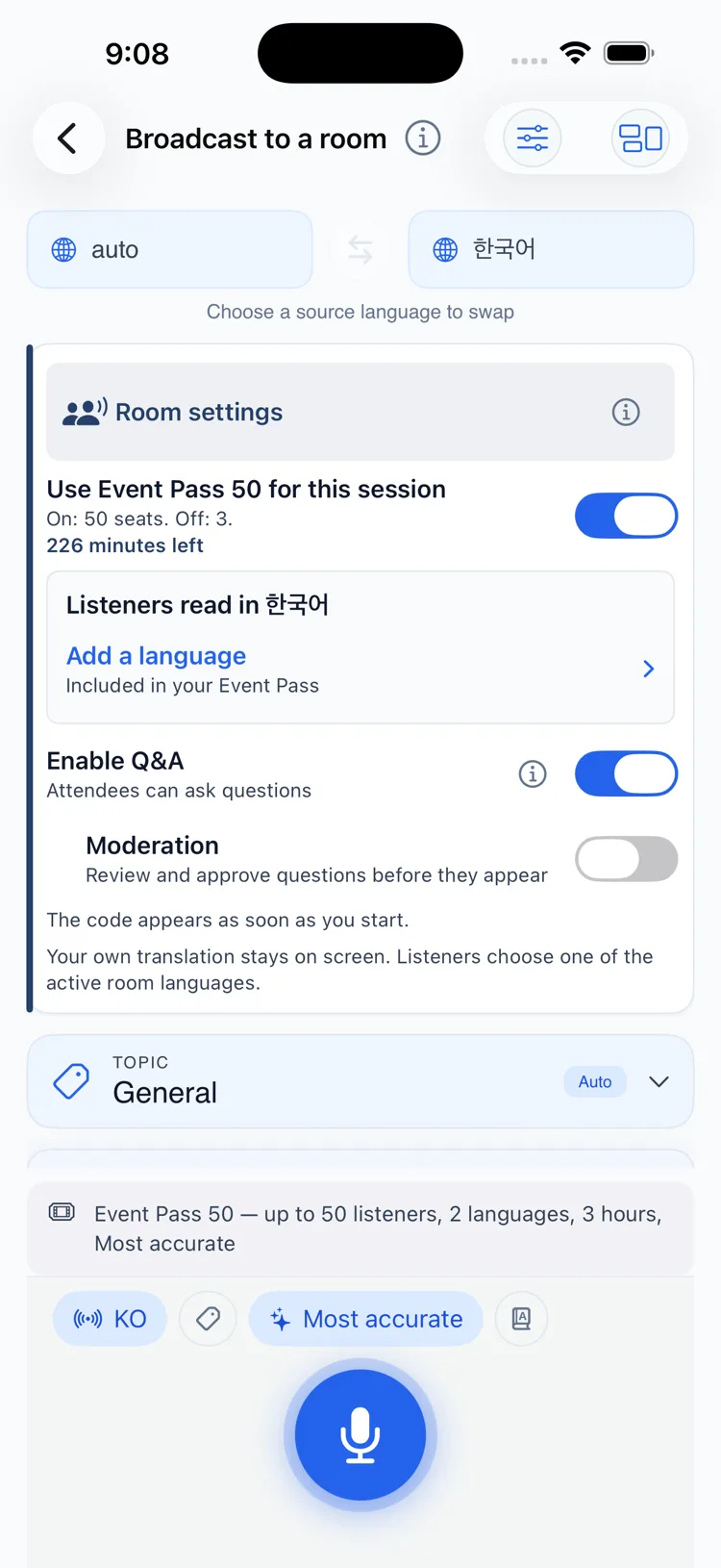
  • The host screen for a room: an Event Pass applied with its seat count and remaining minutes, the language listeners read in, and the Q&A switch with its moderation option.
    Open the room
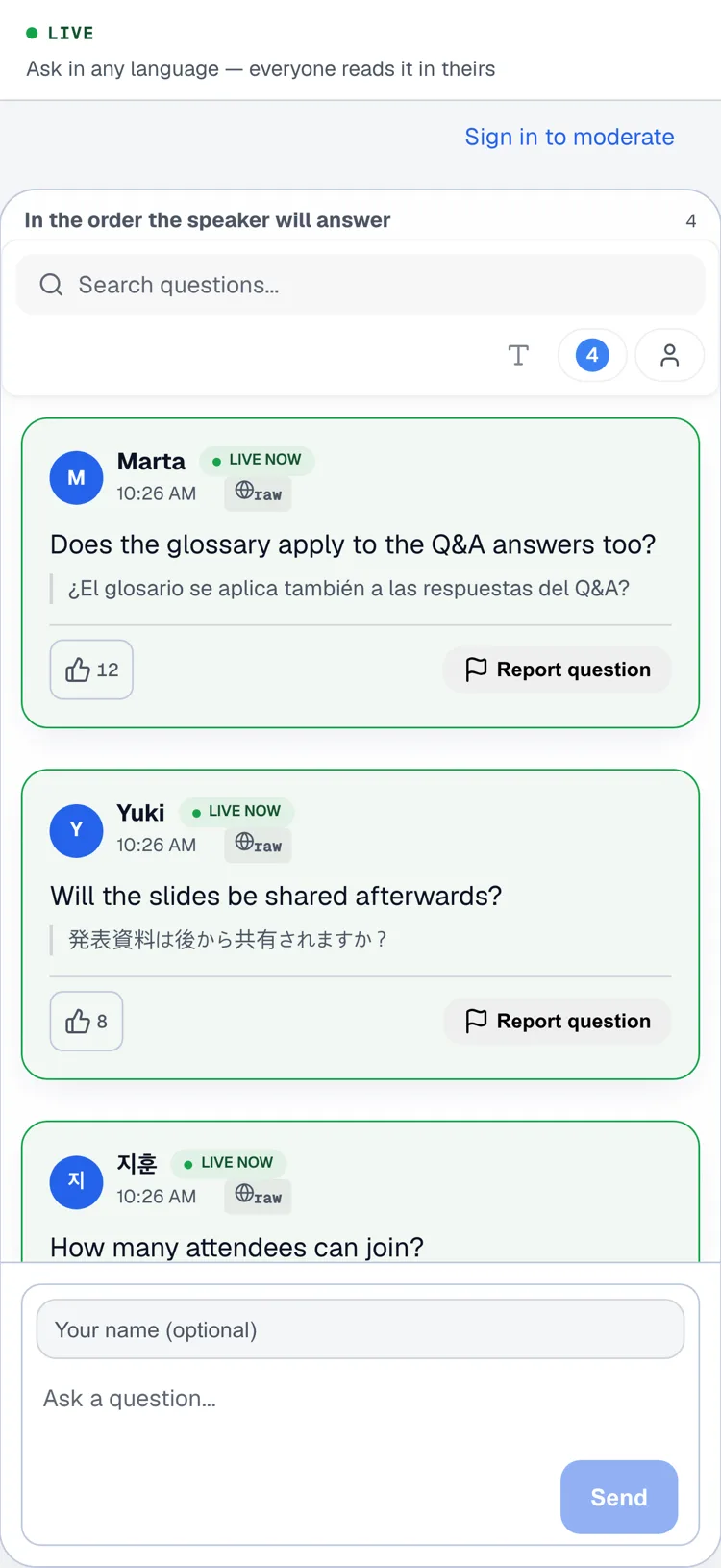
  • The attendee's question list in a browser. Each question shows the reader's own language first and the language it was asked in underneath, with an upvote count.
    Audience Q&A
  • The glossary review screen: terms found in an imported document, each with a confidence score and a check box, and a group set aside as needing a closer look.
    Review the terms

Two different questions, two different answers

Audience Q&AEnterprise Preview

A person asks a person. An attendee submits a question in their language, a moderator can approve or organise it, the speaker picks one to answer, and the written answer reaches each attendee in the language they chose.

AI AskAvailable in the app

A person asks the record. Ask a finished session, a document or a recording what it says, and on long material the answer points back to the passage it came from.

Accuracy

Your terminology, agreed before anyone speaks

  1. Extract

    Import the deck, the paper or the handbook — PDF, Word or PowerPoint — and QolSync AI proposes the terms it found.

  2. Review

    A person decides. Keep the terms that are right, fix the ones that are not, drop the rest. Nothing is applied that nobody approved.

  3. Apply

    Select the glossary for a session and it shapes the live translation and the translated Q&A answers in that room.

Rooms this is built for

Multilingual town hall

One announcement, one room, and nobody waiting for a summary in their language afterwards.

Lecture and training

A prepared glossary carries the course vocabulary, and the recording stays searchable and answerable afterwards.

Community event

Attendees arrive with the phone in their pocket, scan a code, and read along. No install, no account, no handout.

Global team meeting

The people who would otherwise stay quiet can follow at full speed and ask in the language they think in.

Questions people ask before booking

How many people can listen?
Up to 500 listeners on the largest Event Pass. If your event is bigger than that, talk to sales — that is a capacity conversation, not a bigger number we can quote here.
Do attendees need to install anything?
No. They scan a QR code or enter a room code and the session opens in their browser, where they pick the language they want to read or listen in.
How many languages can one room run?
Up to 10 configured audience languages on the 500-listener Event Pass. Smaller passes configure fewer.
Is this the same as the 100+ languages you advertise?
No, and the difference matters. 100+ is the document and audio translation catalogue, where availability and direction vary by mode and provider. A live room configures a smaller set of audience languages, sized by the pass.
Can the audience ask questions?
Yes, in Enterprise Preview. An attendee submits a question in their language, a moderator can approve or organise it, the speaker chooses one to answer, and the written answer reaches each attendee in the language they chose. It is not generally available yet.
What happens to the audio?
Live audio is streamed to a speech-to-text provider for transcription and is not stored by QolSync AI. Transcripts stay on the host device, and nothing is used to train models.
What do we get afterwards?
The session lands in a searchable library with an AI summary. You can ask it questions about what was said and export the transcript or the translation.
What is not ready yet

Audience Q&A is in Enterprise Preview: the feature works, but its capacity, moderation, privacy and accessibility gates are still open, so we run it with you rather than handing it over. The iPhone and iPad app has no App Store listing yet. Everything else on this page is available today.

Tell us about your event

Audience size, date, the languages you need, and how you want the room to work. We will tell you what fits and what does not.

Talk to sales